If you publish long YouTube videos, podcasts or livestreams, an AI clipping tool can turn one upload into a week of YouTube Shorts. OpusClip, Submagic and VEED are three of the most common picks, but they come at the job from different directions:
- OpusClip is a dedicated AI clipper: it finds moments, scores them, reframes to vertical, captions them and can post them for you.
- Submagic started as a captions tool and grew into a short-form editor with Magic Clips for long videos.
- VEED is a full browser video editor whose Clips tool is one feature among many.
This comparison covers pricing, limits, clipping, captions and publishing, then tells you which one fits your channel. Plans and features were checked on OpusClip's, Submagic's and VEED's official pages on October 22, 2026. We have not run a controlled clip-quality test across the three, so we don't rank them on "virality" or AI accuracy; we compare what each company publishes. Prices change often, so confirm before you buy.
OpusClip vs Submagic vs VEED at a glance
| OpusClip | Submagic | VEED | |
|---|---|---|---|
| What it is | Dedicated AI clipping tool | Captions-first short-form editor | All-round browser video editor |
| Best for | Podcasters and long-form YouTubers posting Shorts daily | Creators who want bold animated captions and fast edits | Creators who also need a general editor, subtitles and translation |
| Free plan | Yes: 60 credits/month, watermark, no editing, 3-day export window | No credit card needed to start | Yes, watermarked exports |
| Entry paid price | Starter $15/mo (monthly only) | Starter $12/mo yearly, $19 monthly | See official page (dynamic, localized) |
| Long-video clipping | AI clipping with Virality Score | Magic Clips | Clips tool (video over 2 min with speech) |
| Import from YouTube | Auto-import from a verified YouTube account (paid) | Paste a YouTube URL | Upload a video |
| Captions | Animated captions, 20+ languages | Animated captions, 123 languages | Unlimited subtitles on paid plans (50 hr/mo fair use) |
| Reframe to 9:16 | Auto reframe on all plans | Not its headline feature | Speaker centering in Clips |
| Post to YouTube Shorts | Yes, from Starter | Publishing on Pro and up | Download or share |
| Pricing unit | Credits per month | Videos (credits) per member per month | Per editor seat |
Pricing (checked October 22, 2026)
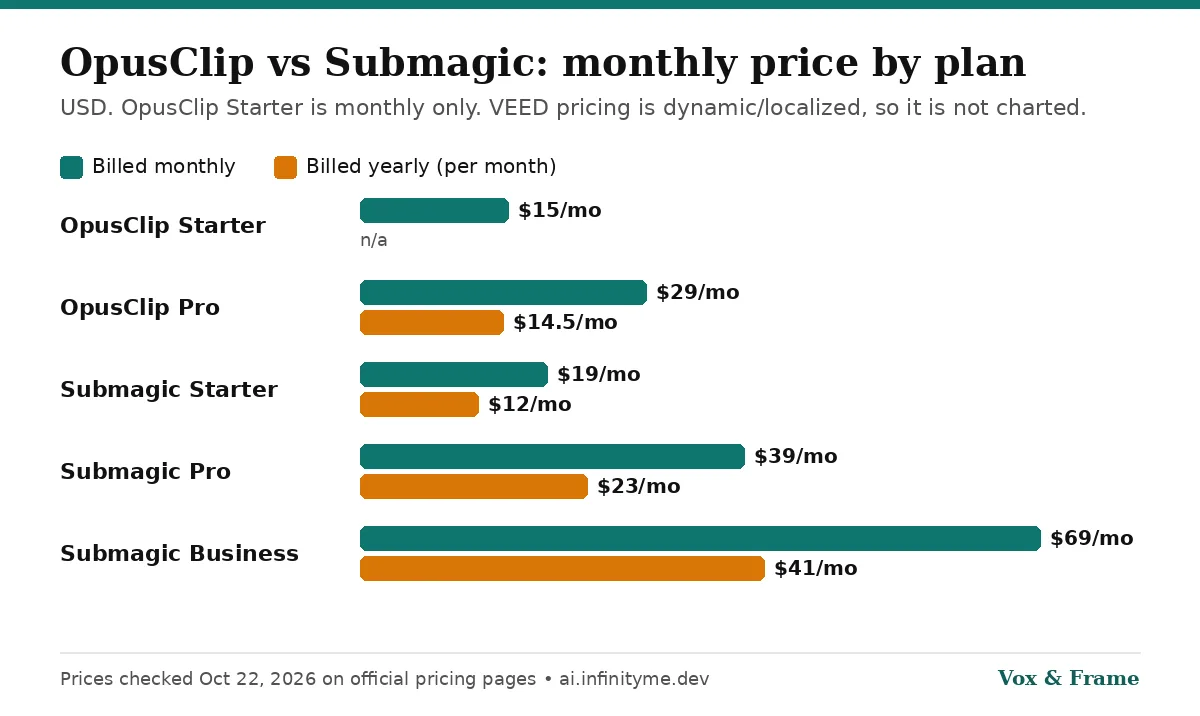
OpusClip
| Plan | Price | Credits | Notable limits and extras |
|---|---|---|---|
| Free | $0 | 60/month | Watermark, no editing, up to 1080p, clips not exportable after 3 days |
| Starter | $15/mo (monthly only) | 150/month | No watermark, Virality Score, auto-post to YouTube Shorts, TikTok and IG Reels, 1 brand template, 30-day export window |
| Pro | $29/mo monthly, or $14.50/mo billed annually ($174/year) | 300/month | Unused credits roll over for 2 months, 2 seats, 2 brand templates, 6 social connections, AI B-roll, scheduler, Premiere Pro and DaVinci Resolve export, 9:16, 1:1 and 16:9 |
| Business | Custom | Custom | Priority processing, API, SSO, dedicated Slack support |
USD, from OpusClip's pricing page. OpusClip advertises "save up to 50% with annual billing", and the Pro figures above reflect that. Pro is sold in packs, so the price rises if you add packs for more credits or seats.
Submagic
| Plan | Billed yearly | Billed monthly | Videos per member/month | Max video length | Export |
|---|---|---|---|---|---|
| Starter | $12/mo | $19/mo | 15 (45 credits) | 2 min | 1080p, 30 FPS |
| Pro | $23/mo | $39/mo | 40 (120 credits) | 5 min | 1080p and 2K, 30 FPS |
| Business | $41/mo | $69/mo | Up to 100 (300 credits) | 30 min | Up to 4K, 60 FPS |
| Custom | Contact sales | Contact sales | Custom | Custom | Custom |
USD per member, from Submagic's pricing page. All paid plans export without a watermark. Pro adds Storyblocks B-roll, auto zooms, removal of bad takes and silences, clean audio, social publishing with analytics and a brand kit. Business adds 4K/60 FPS, more templates, a custom words dictionary, priority rendering and more API minutes. Submagic says yearly billing saves up to 41%.
Note the max video length column: it limits the length of the video you put into the editor. If you plan to feed in full podcast episodes, check how Magic Clips limits apply on your plan, because the pricing page lists "Custom Magic Clips limits" only on the Custom tier.
VEED
VEED's current plan line-up is Free, Creator, Pro, Studio and Enterprise, according to VEED's help center. Its pricing page loads prices dynamically and shows them in your local currency where available, so we could not confirm a single USD figure from the official page and are not quoting one here. Open the page in your browser to see your price.
What VEED's official pricing FAQ does confirm:
- Per-seat billing. The plan price is multiplied by the number of editors in your workspace.
- Subtitles. All paid plans include unlimited subtitle generation, with a fair-use limit of 50 hours per month. Translation is billed by the minute against your plan allowance.
- AI credits. Plans include a monthly or yearly AI credit allowance that refreshes at renewal and doesn't roll over.
- Trials. VEED offers a free trial for enterprise customers with at least 3 users.
Clipping long videos into Shorts
OpusClip is built around this job. Its plans list AI clipping with a Virality Score, auto hook, AI reframe with dynamic layout switching and screenshare/gameplay layouts, and custom clip lengths from under a minute up to 15 minutes. On paid plans it can auto-import from a verified YouTube account, and Pro adds prompt-to-clip, topic search, moving-object tracking and more aspect ratios. If your workflow is "publish a long video, get Shorts out the other end," OpusClip has the most clipping-specific controls of the three.
Submagic Magic Clips takes a YouTube URL or an uploaded file, finds key moments and generates multiple clips with captions, auto zoom and audio cleanup. Submagic positions it for podcasts, webinars and course content. It's a good fit if you want captions and editing polish in the same place you clip.
VEED Clips asks you to upload a video longer than two minutes with spoken audio, choose a clip length and what to highlight, then returns a few clips. VEED says Clips can center the speaker, add subtitles and remove filler words. After that you're inside VEED's full editor, which helps if you need more than a quick Short.
Winner: OpusClip for automated clipping. Submagic is close if captions matter more than clip selection.
Captions and editing
Captions are Submagic's strongest point. It advertises captions in 123 languages, a library of animated caption templates, emojis and GIFs, auto B-roll, transitions, sound effects, background music and AI hook titles. Removing bad takes and silences, plus clean audio, start on Pro.
OpusClip has animated captions in 20+ languages with emoji and keyword highlighting, filler and silence removal, and a text- and timeline-based editor on paid plans. Custom fonts, speech enhancement and AI B-roll from video sources are Pro features.
VEED has the broadest general editor: subtitles, translation, dubbing, AI voice, eye contact correction, background removal and more. You're paying for a whole editing suite, not just a clipper.
Winner: Submagic for captions; VEED for general editing.
Publishing and workflow
OpusClip lets Starter users auto-post to YouTube Shorts, TikTok and Instagram Reels; Pro adds a social media scheduler, multiple profiles per platform and export to Premiere Pro and DaVinci Resolve. That last point matters if an editor finishes your clips elsewhere.
Submagic includes publishing and analytics for social on Pro and above, with 1 publishing profile per platform on Pro and 3 on Business, plus API access (10 minutes/month on Starter and Pro, 100 on Business).
VEED is focused on editing and sharing; its Clips page describes downloading or editing clips and then sharing them to social platforms.
Winner: OpusClip.
Which should you choose?
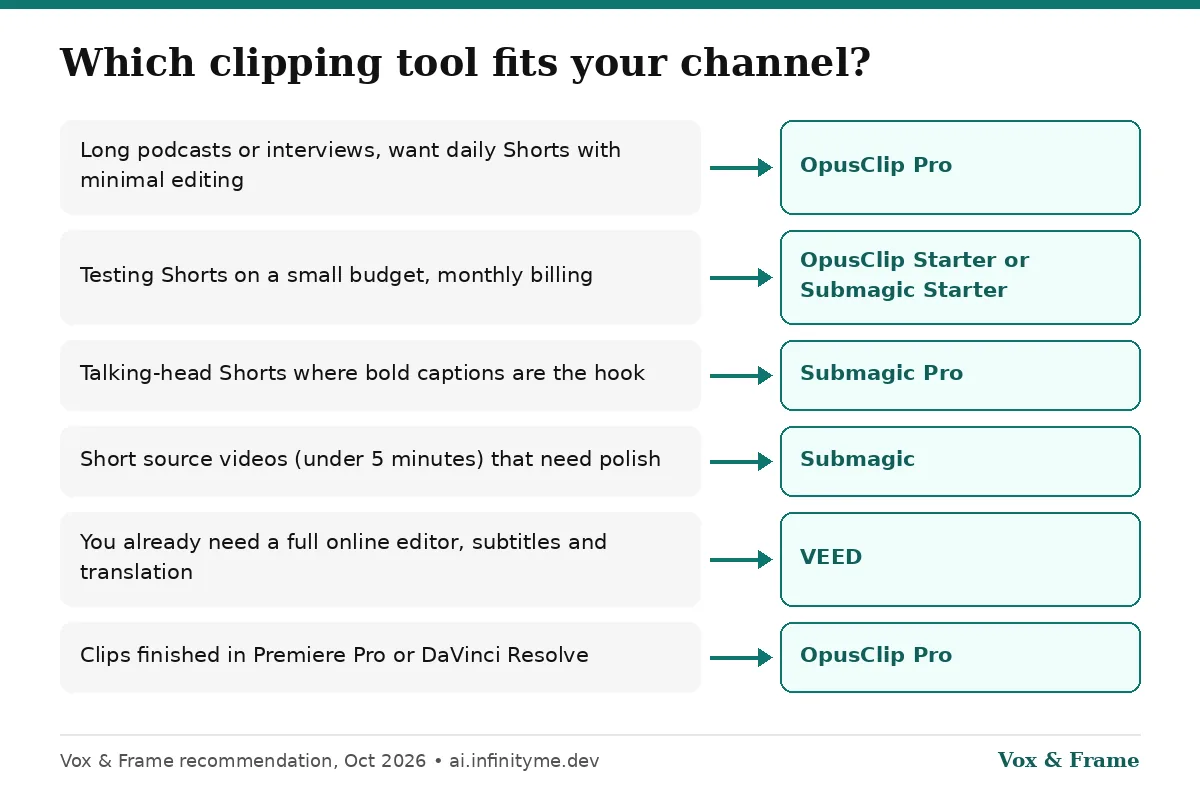
| Your situation | Pick |
|---|---|
| Long podcasts or interviews, want daily Shorts with minimal editing | OpusClip Pro |
| Testing Shorts on a small budget, monthly billing | OpusClip Starter or Submagic Starter |
| Talking-head Shorts where bold captions are the hook | Submagic Pro |
| Short source videos (under 5 minutes) that need polish | Submagic |
| You already need a full online editor, subtitles and translation | VEED |
| A team with several editors | Compare OpusClip Pro packs with VEED's per-seat pricing |
| Clips finished in Premiere Pro or DaVinci Resolve | OpusClip Pro |
Verdict
OpusClip is the best pick for most YouTubers whose main goal is Shorts from long-form video. It's the most clipping-focused, has a usable free tier for testing, and Pro at $14.50/month billed annually (on October 22, 2026) adds the scheduler, multiple aspect ratios and NLE export.
Submagic is the pick when captions and visual polish are the point, especially for short talking-head videos. Starter at $12/month billed yearly is the cheapest paid entry here, but watch the per-plan video length limits.
VEED makes sense if you want one browser editor for everything, with clipping as a bonus. If clipping is your only job, a dedicated clipper is usually the better fit.
If you're unsure, start free on OpusClip, upload one long video, and see whether the clips it picks are worth posting. Then decide whether you need Submagic's caption polish or VEED's broader editor.
Where clipping fits in an AI YouTube workflow
Clippers work on video you already have. If you're building a faceless or voiceover-led channel, the clipper is usually the last step:
- Script and voice. Many faceless channels use ElevenLabs for narration. To budget voice costs across tools, use our AI voiceover cost calculator.
- Build the long video. Script-to-video tools like Pictory or a text-based editor like Descript handle the main edit.
- Cut Shorts. Run the finished long video through OpusClip, Submagic or VEED to get vertical clips with captions.
Sources
All checked October 22, 2026:
- OpusClip pricing
- Submagic pricing
- Submagic Magic Clips
- VEED pricing and FAQ
- VEED Repurpose Video / Clips
- VEED help center: plans
Related guides
Frequently asked questions
Which is cheapest: OpusClip, Submagic or VEED?
+
On October 22, 2026, Submagic Starter was the cheapest paid entry at $12/month billed yearly ($19 monthly). OpusClip Starter was $15/month (monthly billing only) and OpusClip Pro was $14.50/month billed annually ($29 monthly). VEED's pricing page loads prices dynamically and in local currency, so check veed.io/pricing for the figure in your region.
Do OpusClip, Submagic and VEED have free plans?
+
OpusClip has a free-forever plan with 60 credits per month, but clips carry a watermark, there is no editing and clips stop being exportable after 3 days. VEED has a free plan with watermarked exports. Submagic says you can start without a credit card; check its pricing page for current free limits.
Which tool is best for turning a long YouTube video into Shorts automatically?
+
OpusClip is the most clipping-focused of the three: AI clipping with a Virality Score, auto reframe, auto hook, and on paid plans auto-import from a verified YouTube account and posting to YouTube Shorts. Submagic's Magic Clips also accepts a YouTube URL and generates multiple clips. VEED's Clips tool does the job inside a broader general-purpose editor.
Which has the best captions for Shorts?
+
Captions are Submagic's core product. It advertises captions in 123 languages, animated caption templates, emojis and auto zooms. OpusClip offers animated captions in 20+ languages with emoji and keyword highlights. VEED includes unlimited subtitles on paid plans, subject to a 50-hour monthly fair-use limit.
Can I use these tools for faceless YouTube channels?
+
Yes, but they work best when your source video has speech. VEED's Clips tool requires spoken audio and a video longer than two minutes. If you are building a faceless channel from scratch, pair a voice tool like ElevenLabs with a script-to-video tool, then use a clipper to cut Shorts.